Before you start
Step-by-step
Open the practice sheet
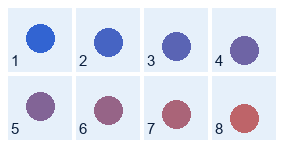
Download the example below and upload it. It is 284 × 148 pixels, with four columns and two rows. You can also try the tool’s built-in sample, but that sample uses a different layout.
Choose the grid
Use the row and column controls: four columns and two rows. For this practice file, each frame is 64 × 64 pixels once the margins and gaps are excluded.
Enter margins and gaps
Set all four outer margins to 8 pixels. Set the horizontal gap and vertical gap to 4 pixels. Inspect the preview: no neighboring cell or transparent gutter should enter a frame.
Download the frames
Save the PNG frames or ZIP. Open the result and verify there are eight images, each 64 × 64 pixels. Use the animation preview to inspect frame order before integrating the files into your project.
Worked example
Eight 64 × 64 frames from a 284 × 148 sheet
The width is 8 + (4 × 64) + (3 × 4) + 8 = 284. The height is 8 + (2 × 64) + 4 + 8 = 148. These dimensions explain why dividing the full image width by four produces the wrong crop size.
- Columns / rows
- 4 / 2
- Top / bottom / left / right margins
- 8 pixels each
- Horizontal / vertical gaps
- 4 / 4 pixels
- Expected files
- 8 PNG images, 64 × 64 each
Check the result
- There are eight PNG frames.
- Every frame is 64 × 64 pixels.
- Frames have no slice of the next cell or extra gutter.
Limits and tips
- This workflow requires a regular grid. Irregularly packed sprites need different crop coordinates.
- The tool does not automatically infer margins and gaps.
- The animation preview is a check; this guide describes PNG/ZIP export, not an engine-specific atlas or GIF export.
Questions
Why are the crops shifted?
Check all four outer margins separately, then check horizontal and vertical spacing. A missing margin shifts every crop.
Can I use this for a tightly packed sheet?
Yes. If there is no padding, set margins and gaps to zero and use the correct rows and columns.
Will it detect the frame size automatically?
Use the visible preview and known measurements. Do not rely on automatic inference of an unknown layout.
Try it with your own file
Open the tool and review the result before sharing it.