Before you start
Step-by-step
Add your receipt photos
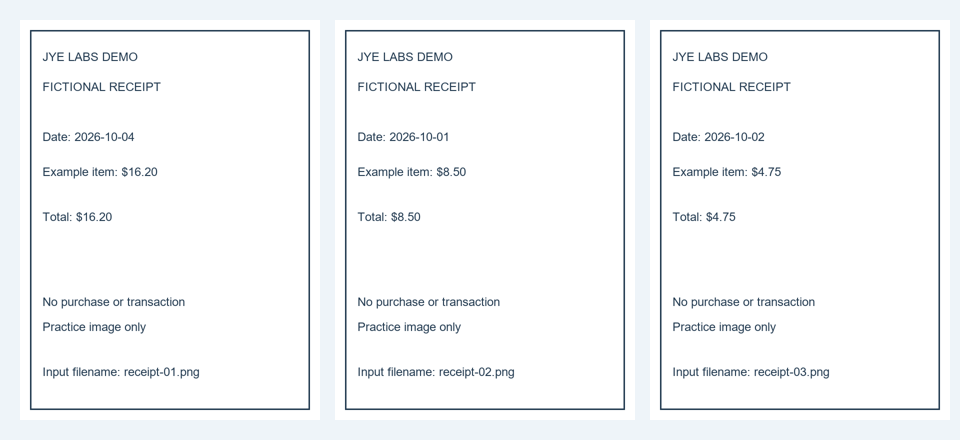
Choose the images or drop them onto the tool. For a safe practice run, use the ZIP of fictional receipts below and extract the three PNG images first.
Put the images in date order
Read each date, then drag the image cards into chronological order. Rotate a sideways photo with the rotation control. The sample filenames intentionally differ from the date sequence.
Choose a page layout
Choose Letter paper and portrait orientation. Use a normal 24-point margin and the fit option that keeps the whole image visible. Use A4 instead when your recipient requires it.
Create and review the PDF
Generate and download the PDF. Open it separately and check there are three pages in the requested sequence, with all text and amounts visible. Keep the original photos.
Worked example
October 1, October 2, then October 4
The sample inputs are receipt-01 (October 4), receipt-02 (October 1), and receipt-03 (October 2). Arrange them as receipt-02, receipt-03, receipt-01. The expected result is three PDF pages, one image per page. All receipts are invented examples.
- Image order
- receipt-02 → receipt-03 → receipt-01
- Paper / orientation
- Letter / portrait
- Margin
- Normal, 24 points
- Image fit
- Keep the whole image visible
Check the result
- The PDF contains three pages ordered October 1, 2, and 4.
- No receipt edge, date, or amount is clipped.
- Text remains readable at a normal viewing size.
Limits and tips
- The result contains receipt images; this workflow does not provide OCR, searchable text, bookkeeping, or tax advice.
- A blurry original remains blurry. Take a clearer photo if text cannot be read.
- Ask the recipient about paper size, order, and file-size requirements.
Questions
Can I reorder images before making the PDF?
Yes. Drag the image cards into the sequence you need before generating the document.
Can I correct a sideways receipt?
Use the image rotation control before creating the PDF, then check the downloaded page.
Does it merge an existing PDF?
This guide uses image inputs. Use a PDF merge tool for existing PDF documents.
Try it with your own file
Open the tool and review the result before sharing it.